

Why Packing the Right Universal Adapter Matters
Traveling internationally means navigating a world of diverse power outlets and voltage standards. Different countries use varying plug types—ranging from Type A in North America to Type G in the United Kingdom, and many others across Europe, Asia, and Africa. Voltage can also differ drastically, often between 100-120V in some regions and 220-240V in others. Without the correct universal adapter and voltage converter, your essential electronics could be rendered useless or damaged.
Many travelers face frustration upon arrival, realizing their devices can’t plug into local sockets or aren’t compatible with the voltage supplied. This can disrupt plans, especially when devices like smartphones, laptops, or cameras need charging daily. Moreover, relying on makeshift or incompatible adapters risks short circuits or device failure, which can be costly and inconvenient abroad.
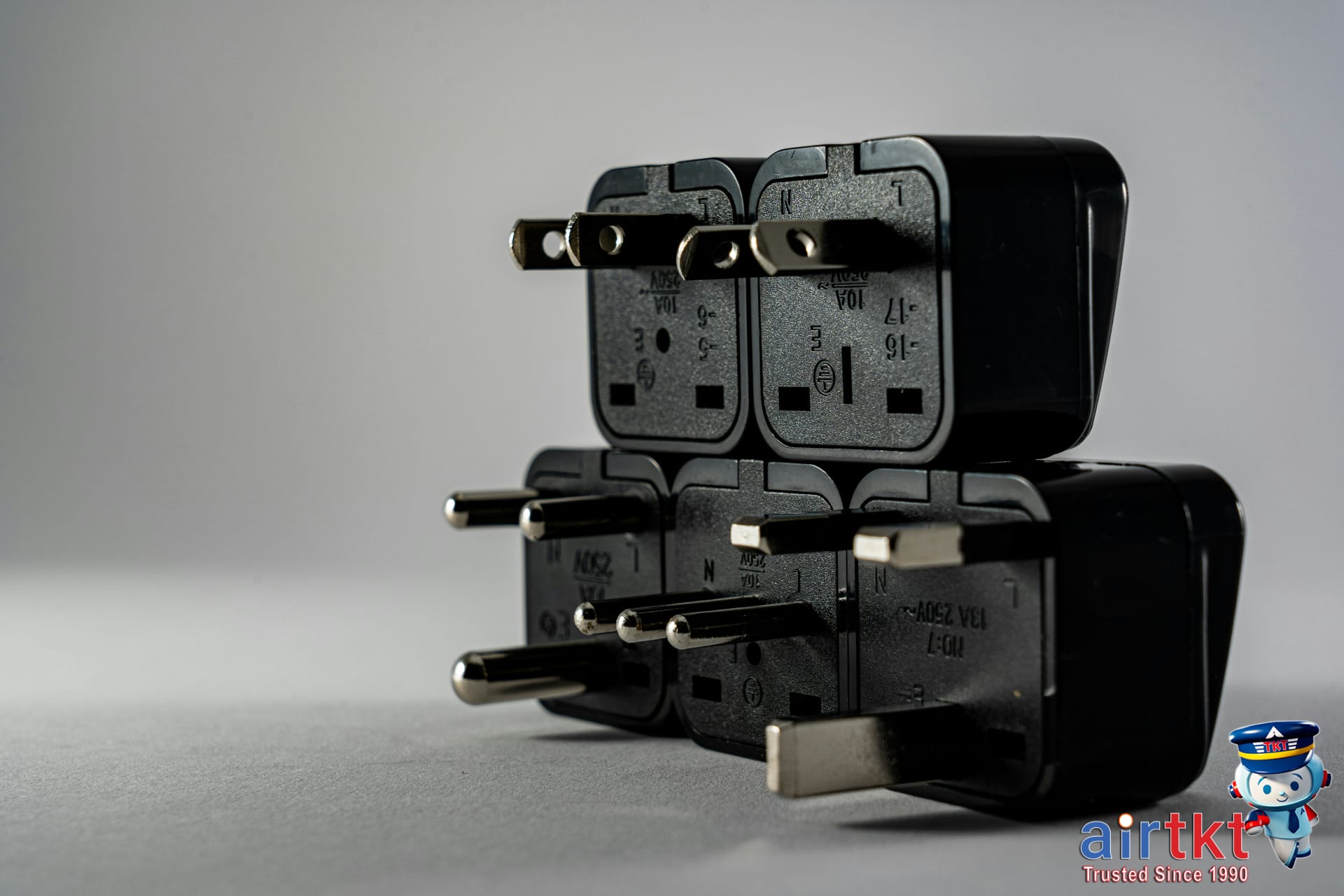

Another vital factor is adhering to TSA rules and airline carry-on restrictions when packing adapters and electronic devices. While a universal adapter is generally permitted, some adapters with built-in surge protectors or batteries may be subject to additional screening. Airlines often impose strict limits on batteries, charging devices, and electronic accessories in carry-ons, requiring travelers to check regulations in advance. Packing compliant adapters avoids delays at security checkpoints and prevents confiscation.
Understanding and incorporating the right universal adapter into your luggage ensures seamless device use worldwide and eliminates the risk of electrical issues or TSA complications. For efficient packing, choose a compact, TSA-approved universal adapter compatible with multiple socket types and voltage ranges. This preparation unlocks hassle-free power access, letting you focus on your travel experience rather than technical setbacks.
Comprehensive Universal Adapter Packing Checklist
Packing the right universal adapter and accessories is essential for seamless charging during your travels. To avoid scrambling for compatible plugs or frying your devices, prepare thoughtfully based on your itinerary and device needs. Here’s a detailed checklist to ensure you’re fully equipped.
Universal Adapter and Regional Plugs
A reliable universal adapter should cover the main plug types for your destination regions. Typically, this includes:
- Type A/B: Used across North and Central America, and Japan.
- Type C: Common in most of Europe, South America, and Asia.
- Type G: Found mostly in the UK, Ireland, and some parts of the Middle East and Africa.
- Type I: Predominant in Australia, New Zealand, and China.
Choose an adapter set that integrates these plug variants. If traveling across multiple continents, a multi-plug adapter with interchangeable heads simplifies conversions without carrying bulky individual pieces.
Power Converter or Voltage Transformer Usage
While many modern devices support dual voltage (100-240V), some older electronics and appliances may not. A power converter or voltage transformer becomes necessary in these cases. Consider including one if:
- You plan to use devices like curling irons, hair dryers, or medical equipment that demand specific voltages.
- Your device label does not list a voltage range compatible with the destination’s supply.
- Your universal adapter lacks voltage conversion functionality.
Keep in mind, converters add weight and bulk—only pack if essential to avoid unnecessary luggage heaviness.
Surge Protectors and USB Charging Hubs
Protect your valuable electronics from unpredictable power surges by packing a surge protector with built-in universal plugs. Additionally, USB charging hubs provide the convenience of powering multiple USB devices simultaneously using a single wall outlet.
- Surge protectors safeguard laptops, phones, and cameras from voltage spikes common in some regions.
- USB hubs reduce cable clutter and free up wall sockets, especially in hotels with limited outlets.
Extra Charging Cables and Plugs
Bring spares of your most-used cables and plugs to minimize disruption if one is lost or damaged. Recommended quantities depend on your gadget count and trip length:
- Short trips (up to one week): 1 extra USB-C or Lightning cable; 1 extra wall plug or car adapter.
- Longer trips (2+ weeks): 2 extras of each cable type and plug.
- Multiple-device travelers: 3 or more spares advised, especially for various devices like phones, tablets, and power banks.
Protective Cases and Pouches
Keeping your adapters, plugs, and cables organized is vital. Compact, padded cases or dedicated pouches prevent tangled cords and safeguard delicate electronics from physical damage. Opt for cases with compartments or elastic loops that hold items securely during transit.
Compact Extension Cords
A small extension cord broadens outlet accessibility in crowded hotel rooms or conference centers. Choose a lightweight, flexible cord that complements your adapter setup.
Adjusting Quantities for Trip Duration and Destinations
Travel duration and itinerary complexity should guide how much tech gear you pack. For brief city breaks, a basic adapter with minimal extras suffices. Longer journeys or multi-country tours benefit from added versatility:
- Single-destination, short trip: 1 universal adapter, essential plugs, a USB hub, and minimum extra cables.
- Extended or multi-destination travels: Multiple adapters or a highly modular adapter system, extra cables, surge protector, converter if needed, and organizational cases.
Planning accordingly ensures you carry precisely what’s necessary without excess baggage.
Top Universal Adapter Brands Across Price Ranges
Choosing the right universal adapter depends heavily on your budget, travel frequency, and the features you prioritize. Below, we break down popular universal adapter brands across budget, mid-range, and premium categories, emphasizing key attributes such as durability, outlet compatibility, USB ports, and safety certifications.
Budget-Friendly Brands
For occasional travelers or those on a tight budget, brands like BESTEK and Ceptics offer reliable options under $25. These adapters usually cover the most common outlet types worldwide and include 1-2 USB ports for charging smaller devices.
- Pros: Affordable, lightweight, compact.
- Cons: Limited USB ports, may lack advanced surge protection, less durable build.
BESTEK adapters are praised for simple plug-and-play design, perfect for short trips. Ceptics models often have interchangeable plugs, allowing better customization on a minimal budget. However, frequent international travelers might find their durability wanting during frequent use.
Mid-Range Universal Adapter Brands
Mid-range adapters, often priced between $30 and $60, include brands like EPICKA and NEWVANGA. These adapters feature robust construction, enhanced compatibility with up to 150 countries, multiple USB ports (ranging from 4 to 6), and fast charging support.
- Pros: Solid durability, broader socket compatibility, multiple USB and AC outlets.
- Cons: Slightly bulkier, higher cost with occasional brand recognition gaps.
EPICKA adapters come equipped with smart IC technology to automatically adjust charging rates, which helps safely power smartphones, tablets, and laptops simultaneously. NEWVANGA units often include built-in surge protection and LED indicators, appealing to travelers who need extra safety without premium prices.
Premium Universal Adapter Brands
For frequent international travelers or professionals, premium adapters from brands such as Skross, Ceptics Pro, and Epicka Pro deliver superior durability and functionality, typically costing $60 and above.
- Pros: High-grade materials, extensive country coverage, multiple USB-C and USB-A ports, fast charging, and advanced safety features.
- Cons: More expensive and sometimes heavier to carry.
Skross adapters, known for Swiss engineering, offer precision fit with flawless compatibility across more than 150 countries. Meanwhile, Ceptics Pro models include built-in surge protectors and certified flame-retardant materials for enhanced safety. Epicka Pro’s top-tier line also supports Power Delivery (PD) charging, ideal for the latest devices like MacBooks.
Safety Certifications to Prioritize
When selecting a universal adapter, look for safety certifications ensuring quality and compliance. The most common marks include:
- CE (Conformité Européenne): Confirms compliance with European Union safety standards.
- FCC (Federal Communications Commission): Validates electromagnetic safety standards in the US.
- RoHS: Indicates restriction of hazardous substances, beneficial for environmental and user safety.
Certified adapters reduce risks of electrical shocks, overheating, and equipment damage. Always verify the presence of these marks before purchasing to protect your gear and yourself on the road.
Choosing Based on Travel Frequency
For frequent international travelers, investing in a premium adapter with multiple USB-C ports, surge protection, and broad compatibility is wise. The durability and safety features pay off over time.
Occasional travelers can opt for budget or mid-range models focused on simplicity and portability. These deliver adequate performance without the higher upfront cost, especially when travel involves a few short trips annually.
Space-Saving and Weight Distribution Packing Techniques
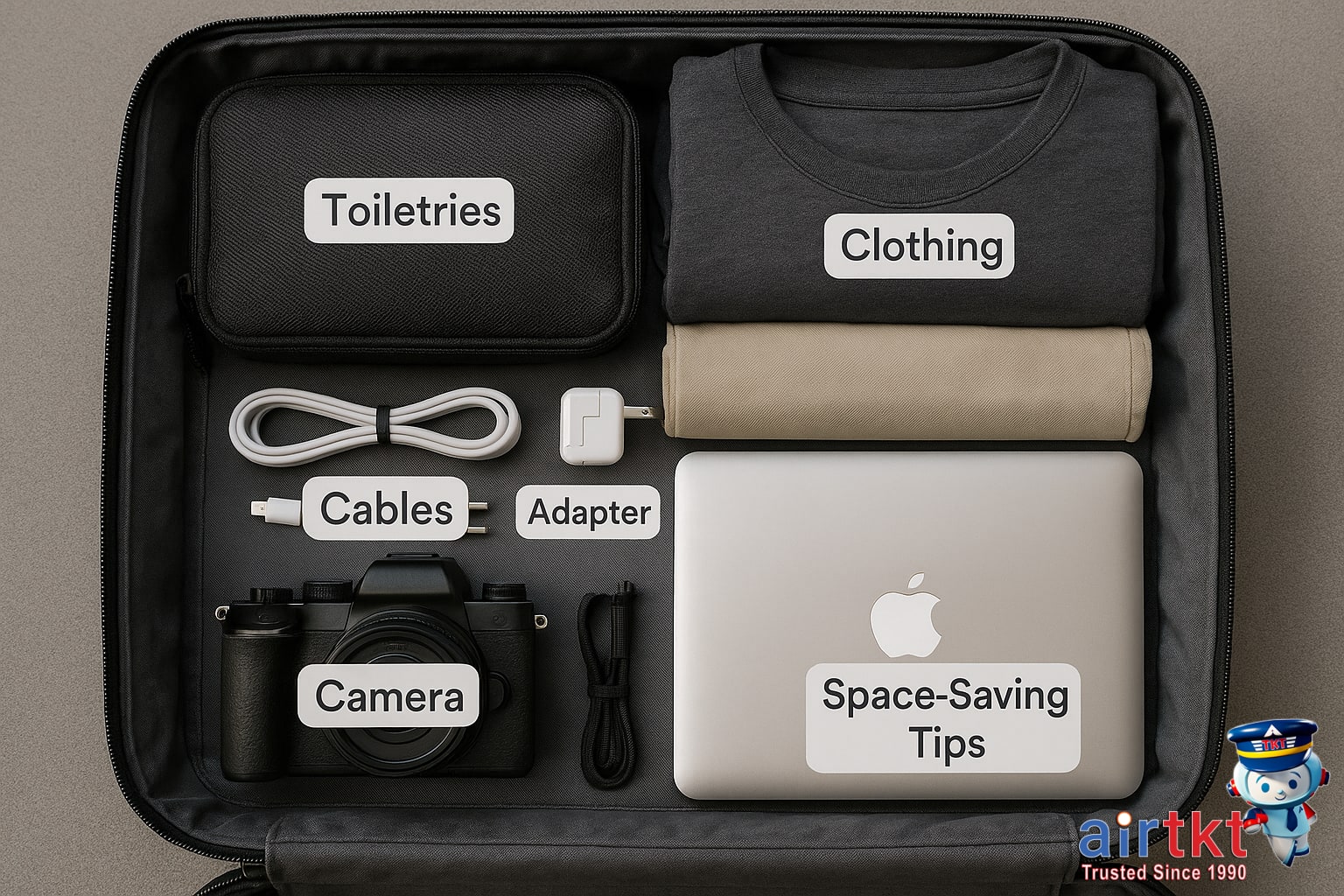
Packing universal adapters and accessories efficiently can save precious luggage space and help avoid overweight fees. Using the right packing methods also balances your luggage, making it easier to carry and preventing damage to your gear. Let’s explore practical techniques to optimize both space and weight distribution.
Compare Rolling and Folding Cables
When it comes to packing cables, rolling them is generally more space-efficient than folding. Rolling cables tightly into small coils minimizes air pockets and reduces tangling. It keeps cables compact and organized, allowing you to fit more accessories into tight spaces. Folding cables, in contrast, can create bulky folds and twists that waste space and require more room.
Try rolling each cable individually and securing it with a small elastic band or reusable Velcro strap. This prevents cables from unraveling and mixing with other items. Whether it’s charging cords, universal adapters, or headphone cables, rolled is the way to go for max space-saving.
Use Packing Cubes or Pouches for Organization
Packing cubes or small zippered pouches specially designated for tech gear keep your accessories neatly contained. These containers create separate compartments within your suitcase, protecting adapters, chargers, and cables from getting damaged or lost.
Choose packing cubes made from lightweight, durable fabric with mesh panels to easily spot contents. Assign one cube for all your power adapters and another for smaller items like USB drives and airplane plugs. This system improves organization and speeds up security checks.
Position Heavy Items Near Bottom of Suitcase
For balanced weight distribution, place your heavier items such as universal adapters and power bricks near the bottom of the suitcase, closest to the wheels. This anchors your luggage’s center of gravity low, improving stability and making your suitcase easier to roll.
Keep lighter items like cables, headphones, and adapters stacked on top or in side compartments. This prevents your luggage from toppling or feeling top-heavy, reducing strain when lifting or carrying.
Utilize Shoe Compartments for Small Accessories
Empty shoe compartments are often overlooked storage spots perfectly sized for cables, small adapters, and accessories. Placing these items inside your shoes protects them from damage and efficiently uses all available space.
Wrap cables with soft cloth or place them in small pouches before fitting them into shoe compartments. This approach prevents tangling and keeps fragile adapters cushioned. Plus, shoes create a natural barrier, so your cables won’t shift while traveling.



TSA Compliance and Airport Security Tips for Universal Adapters
When traveling internationally, bringing a universal adapter is essential for powering your devices. However, understanding the TSA regulations regarding electronic adapters can save you from unnecessary delays or confiscation. Currently, the TSA allows electronic adapters, including universal adapters and power strips, to be packed in either carry-on or checked luggage, but keeping them accessible in your carry-on is highly recommended for smoother security screening.
Power strips are permitted as long as they do not contain lithium batteries or other prohibited components. Adapters with built-in surge protectors are generally accepted, but devices that overwhelm the screening system with cords or appear suspicious might require additional inspection. To avoid triggering extra scrutiny, pack adapters neatly and avoid excessive cables tangled together.
Recommended packing practices include placing your universal adapter in a clear, separate pouch within your carry-on bag. This makes it easy for TSA agents to inspect the device without unpacking your entire suitcase. Avoid wrapping adapters with other metallic objects, as this can cause alarming signals during X-ray scans. Always check that any accompanying charger or power strip fits the travel voltage requirements of your destination to comply with local electrical standards and avoid device damage.
During security screening, be ready to remove your electronic devices, including tablets, laptops, and adapters, from your bag if asked. Placing all electronics in a single bin speeds up the process and reduces the chance of your adapter being singled out. If you have adapter components stored in different pockets, consolidate them before reaching the scanner. TSA officers may ask questions about your electronic devices, so having documentation like a user manual or packaging handy can provide quick explanations, minimizing delays.

Choosing to travel with your universal adapter in carry-on luggage also reduces the risk of loss or damage. Checked baggage handling can be rough, and sensitive electronics can be compromised. Moreover, keeping your devices close allows for immediate access if security personnel request a closer inspection. If you anticipate using multiple devices, consider labeling your adapters to facilitate identification during screenings.
Another useful strategy is to familiarize yourself with the TSA’s official travel guidelines before your trip. These rules can change, especially regarding battery-powered electronics and power banks often bundled with adapters. Staying updated prevents surprises at the checkpoint and helps you plan the optimal packing configuration.
Common Mistakes to Avoid When Packing Your Universal Adapter
Travelers often underestimate the importance of properly packing their universal adapter, leading to avoidable hassles abroad. One frequent mistake is carrying incompatible adapters without verifying the voltage requirements or plug types of the destination country. Despite universal adapters being versatile, not all support every voltage standard or plug shape, so double-checking before departure can prevent device damage or the inability to charge essential gadgets.
Another common error is overpacking unnecessary accessories, which adds weight and clutter to your luggage. Many travelers bring multiple cords, chargers, and splitter attachments that often go unused. Streamlining your kit to include only the components you truly need not only lightens your load but also reduces the risk of losing or misplacing items.
Ignoring TSA and airline packing rules is another pitfall. Universal adapters, especially those with built-in batteries or complex mechanisms, may raise flags during security screening. Packing adapters in accessible spots and ensuring they comply with airline restrictions helps avoid delays or confiscations at checkpoints.
Forgetting backup charging cables and essential powering components is a frequent oversight. If your main cable malfunctions or your adapter lacks integrated cords, having spares can be a lifesaver. This small precaution ensures you stay connected even in unexpected situations.
To avoid these pitfalls, take a moment to research your destination’s electrical standards and airline policies related to electronic devices. Organize your universal adapter kit neatly in a dedicated pouch so you can easily inspect and access each part. By taking these simple measures, you’ll improve your travel readiness and prevent common hassles associated with adapter use.
Final Checklist and Smart Packing Practices
Before setting off on your adventure, a well-prepared packing plan can make all the difference. To help you stay organized and stress-free, here is a printable universal adapter checklist highlighting essential items for your trip:
- Universal travel adapter with multiple plug types
- Spare adapter plugs for different regions
- USB charging cables for all devices
- Power bank with sufficient capacity
- Voltage converter (if needed for your electronics)
- Protective carrying case for adapters and chargers
- Device manuals or offline copies of instructions
- Labelled cables to avoid confusion
Printing and checking off these items as you pack helps ensure you don’t leave critical gear behind. Smart packing starts with proactive planning. Reviewing your itinerary, the countries you’ll visit, and their power plug standards prior to packing saves last-minute runs to electronics stores or costly airport purchases.
Keep in mind, adherence to Transportation Security Administration (TSA) and airline regulations is crucial to avoid delays or confiscation. Items like lithium-ion batteries in power banks have quantity and packaging restrictions. Always place adapters and chargers in carry-on bags to prevent damage or loss. Double-check airline baggage rules for electronics during your booking process with AirTkt, which offers up-to-date regulations and friendly customer support.
Ultimately, thoughtful preparation means less airport stress and more time enjoying your travel experience. Use the checklist as your last step before departure and confirm compliance with all travel guidelines. With every adapter and cable accounted for, you’ll stay connected and powered up wherever you go.
Tip: Review your packing list a day before your trip to catch any overlooked items, and consider storing digital copies of important documents and travel itineraries on your devices or cloud storage.
Frequently Asked Questions About Packing Universal Adapters
What is a universal adapter and why do I need one for international travel?
A universal adapter is a versatile travel accessory that enables you to plug your electronic devices into power outlets in different countries. Since plug shapes and socket types vary worldwide, a universal adapter ensures your chargers and devices stay powered, making it essential for international travel.
How to choose the right universal adapter for different countries?
Select a universal adapter based on your destination’s plug types—commonly Type A, C, or G. Look for models covering multiple standards to accommodate future trips. Check specifications to ensure compatibility with both voltage and plug shape requirements of the countries you’re visiting.
When should I pack a power converter or voltage transformer with an adapter?
Pack a power converter or voltage transformer if your devices don’t support the local voltage, typically 220-240V overseas versus the 110-120V common in the US. Adapters change plug shapes but don’t adjust voltage, so converters protect sensitive electronics from damage due to voltage differences.
Why is TSA compliance important when packing a universal adapter?
TSA compliance matters because some adapters contain lithium batteries or smart features flagged during security screening. Carrying TSA-approved adapters helps prevent delays, confiscation, or additional inspections, ensuring a smooth airport experience.
Can I bring multiple universal adapters in my carry-on luggage?
Yes, you can bring multiple universal adapters in your carry-on. It’s wise if traveling with family or multiple devices. Just pack them neatly to avoid bulk and ensure they comply with airline carry-on size rules and TSA regulations.
What are the best space-saving tips for packing universal adapters?
To save space, choose compact, lightweight universal adapters with built-in USB ports. Store adapters inside shoes or small pouches to maximize luggage efficiency. Avoid bulky converters unless absolutely necessary, and consider multi-device charging stations to reduce multiple adapters.
How do I avoid common mistakes when packing a universal adapter?
Avoid forgetting to check voltage compatibility and packing adapters matching your destination plugs. Don’t rely solely on adapters for voltage conversion. Double-check TSA rules and keep adapters accessible in your carry-on for easy use upon arrival.